
Graphic design requires more than creativity. The right combination of software, hardware, and supporting tools can make everyday tasks faster, more comfortable, and more precise. From creating logos and illustrations to editing photos and designing digital content, different projects call for different equipment.
With so many options available, finding the best tools for graphic design can be difficult, especially for beginners building their first creative setup. Instead of buying everything at once, it is more practical to focus on the tools that match your workflow. The following categories cover the essential tools for different design workflows.
1. Graphic Design Software
Design software is the foundation of most digital creative workflows. The right application depends on what you create.
Vector design software is useful for logos, icons, typography, and illustrations that need to remain sharp at different sizes. Photo editing software, on the other hand, is better suited to image retouching, compositing, and manipulating photographs.
Designers working on websites and mobile applications may also need UI and prototyping tools. Rather than relying on one application for every task, many professionals use several programs together.
Choosing software based on your actual projects is one of the first steps toward building the best tools for graphic design for your needs.
2. A Capable Computer
Creative software can consume considerable processing power, particularly when working with large files, high-resolution images, or multiple applications.
A suitable computer should generally offer:
· A modern multi-core processor
· Sufficient RAM for multitasking
· Fast SSD storage
· A graphics processor suitable for your design applications
· Enough ports for external displays and accessories
The required specifications depend on your workload. A designer creating simple social media graphics may not need the same hardware as someone working with complex illustrations or large print files.
For this reason, computer performance should be considered alongside other best tools for graphic design, rather than separately.
3. A High-Quality Display
Designers need to see their work clearly while checking colors, details, contrast, and composition. A high-quality display can therefore make a significant difference.
Resolution is particularly important when working with detailed illustrations or photographs. A higher-resolution screen provides more workspace and makes small elements easier to inspect. Color performance is equally important for branding, digital artwork, and print-related projects.
A larger monitor can be useful for designers who mainly work at a desk, while a portable display may be more suitable for those who frequently work in different locations.
A reliable, color-accurate display is therefore one of the best tools for graphic design for anyone who depends on visual precision.
4. A Pen Display for Digital Drawing
For illustrators and artists, a pen display can provide a more natural alternative to drawing with a mouse. Designers can draw directly on the screen using a pressure-sensitive stylus, making tasks such as sketching, painting, retouching, and handwritten lettering more intuitive.
The best tool for graphic design does not necessarily have to be the most expensive device. Instead, designers should consider display quality, pen performance, portability, and how easily the device fits into their existing workflow.
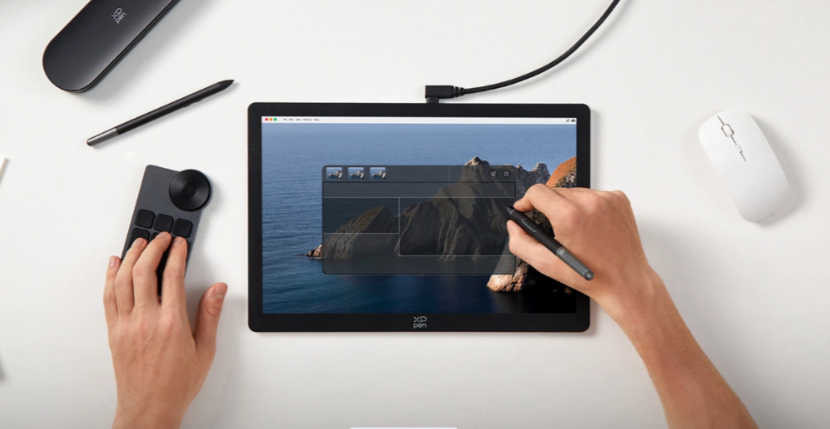
One example is the XPPen Artist Ultra 14, which combines a 14-inch 2.8K OLED display with an ultra-slim design. Its native 10-bit color depth supports smoother color transitions, while its 99% Adobe RGB color gamut helps present detailed colors.
The device also supports dual stylus use and features an X-Touch solution for convenient one-handed canvas control. These features can be useful for artists who want a portable workspace for illustration and graphic creation.
5. Comfortable Input Devices
A responsive stylus can improve precision, but other input devices also play an important role in design productivity. A comfortable keyboard and mouse can make navigating complex software and using shortcuts much easier.
For designers who spend several hours working each day, ergonomics should also be considered. A suitable desk height, comfortable chair, and properly positioned display can reduce unnecessary strain.
The best tools for graphic design should not only improve creative performance but also support a comfortable working routine.
6. Cloud Storage and Backup
Creative projects can contain hours of work, making reliable file storage essential. Hardware failure, accidental deletion, or corrupted files can cause significant problems if there is no backup.
Cloud storage provides a convenient way to keep additional copies of important projects and access files across different devices. External drives can provide another layer of protection, particularly for large design libraries.
A simple backup routine can include:
1. Keeping active projects on the main computer.
2. Creating regular local backups.
3. Storing important files in the cloud.
4. Archiving completed projects separately.
Although these tools do not directly create artwork, they are an important part of a reliable creative workflow.
7. Reference and Organization Tools
Designers often spend as much time organizing ideas as they do creating artwork. Reference and organization tools can help collect images, typography ideas, color palettes, project notes, and client feedback.
Mood boards are useful when developing a visual direction, while note-taking and project management tools can help keep deadlines and revisions organized.
Keeping references and project assets in one place can reduce distractions and make the creative process more efficient.
8. Choosing Tools Based on Your Design Work
There is no single setup that qualifies as the best tools for graphic design for everyone. Your ideal combination depends on the type of work you do most frequently.
| Design Work | Useful Tools |
| Logo Design | Vector software, computer, color-accurate display |
| Digital Illustration | Drawing software, pen display, stylus |
| Photo Editing | Photo editing software, high-resolution display |
| UI/UX Design | UI software, computer, reference tools |
| Social Media Design | Graphic software, templates, cloud storage |
| Print Design | Layout software, color-accurate display |
For example, a branding designer may prioritize vector software and typography tools, while a digital illustrator may place greater emphasis on pen performance and display quality.
9. How to Select the Right Design Tools
When comparing the best tools for graphic design, start with your workflow rather than product specifications alone.
Consider compatibility. Make sure new hardware works with your computer and preferred design software.
Consider your main tasks. Prioritize tools that improve the work you perform most often.
Consider display quality. Resolution and color performance become increasingly important for detailed visual work.
Consider portability. If you work between different locations, a compact setup can be more practical than a large desktop-only configuration.
Consider long-term value. A reliable tool that fits your workflow may be a better investment than a cheaper option that needs frequent replacement.
Conclusion
The best tools for graphic design are not necessarily the tools with the most features. They are the ones that make your specific workflow more efficient, accurate, and comfortable.
A practical design setup may include capable software, a suitable computer, a quality display, reliable input devices, and dependable storage. For digital artists, a portable pen display can further improve the drawing experience by combining direct screen interaction with accurate visual output.
By understanding your creative requirements before purchasing new equipment, you can build a more focused setup without unnecessary spending. Whether you are a beginner exploring graphic design or an experienced professional refining your workspace, choosing tools based on actual workflow needs will always be more effective than simply following trends.


